
Spaces:
Running

Running
File size: 13,840 Bytes
f8e9610 4ae1184 f8e9610 bd30014 f8e9610 038342d 1c8c6ec 553f9da 038342d 1c8c6ec b743a8f 553f9da 2d588e3 b743a8f ec952fc a30250a 553f9da b743a8f 553f9da b743a8f 553f9da a30250a 553f9da f7e7a26 553f9da a30250a 553f9da f146e60 33f121d f146e60 33f121d f146e60 33f121d f146e60 33f121d f146e60 553f9da 3940428 553f9da 3940428 553f9da 4053c80 553f9da db754b9 3940428 fb084f1 dd2517b 553f9da 3940428 223053f 3940428 2d588e3 15da154 2d588e3 7f63688 15da154 2d588e3 b743a8f bfca9bd b743a8f 553f9da 223053f 553f9da 223053f 3179f23 223053f dc08671 b8d3a49 dc08671 b8d3a49 dc08671 d8e8998 b8d3a49 d8e8998 223053f 2d588e3 223053f 2d588e3 d8e8998 50f37bd d8e8998 223053f fb084f1 3d0d76e 223053f f4faf43 223053f 4ae1184 553f9da 4ae1184 553f9da 4ae1184 ec952fc b0f4af0 606732e 2d588e3 354c4c3 2d588e3 b0f4af0 fe90833 2d588e3 |
1 2 3 4 5 6 7 8 9 10 11 12 13 14 15 16 17 18 19 20 21 22 23 24 25 26 27 28 29 30 31 32 33 34 35 36 37 38 39 40 41 42 43 44 45 46 47 48 49 50 51 52 53 54 55 56 57 58 59 60 61 62 63 64 65 66 67 68 69 70 71 72 73 74 75 76 77 78 79 80 81 82 83 84 85 86 87 88 89 90 91 92 93 94 95 96 97 98 99 100 101 102 103 104 105 106 107 108 109 110 111 112 113 114 115 116 117 118 119 120 121 122 123 124 125 126 127 128 129 130 131 132 133 134 135 136 137 138 139 140 141 142 143 144 145 146 147 148 149 150 151 152 153 154 155 156 157 158 159 160 161 162 163 164 165 166 167 168 169 170 171 172 173 174 175 176 177 178 179 180 181 182 183 184 185 186 187 188 189 190 191 192 193 194 195 196 197 198 199 200 201 202 203 |
---
title: SlideDeck AI
emoji: 🏢
colorFrom: yellow
colorTo: green
sdk: streamlit
sdk_version: 1.52.1
app_file: app.py
pinned: false
license: mit
---
[](https://pypi.org/project/slidedeckai/)
[](https://codecov.io/gh/barun-saha/slide-deck-ai)
[](https://slidedeckai.readthedocs.io/en/latest/?badge=latest)
[](https://opensource.org/licenses/MIT)
[](https://huggingface.co/spaces/barunsaha/slide-deck-ai)
# SlideDeck AI: The AI Assistant for Professional Presentations
We all spend countless hours **creating** slides and meticulously organizing our thoughts for any presentation.
**SlideDeck AI is your powerful AI assistant** for presentation generation. Co-create stunning, professional slide decks on any topic with the help of cutting-edge **Artificial Intelligence** and **Large Language Models**.
**The workflow is simple:** Describe your topic, and let SlideDeck AI generate a complete **PowerPoint slide deck** for you—it's that easy!
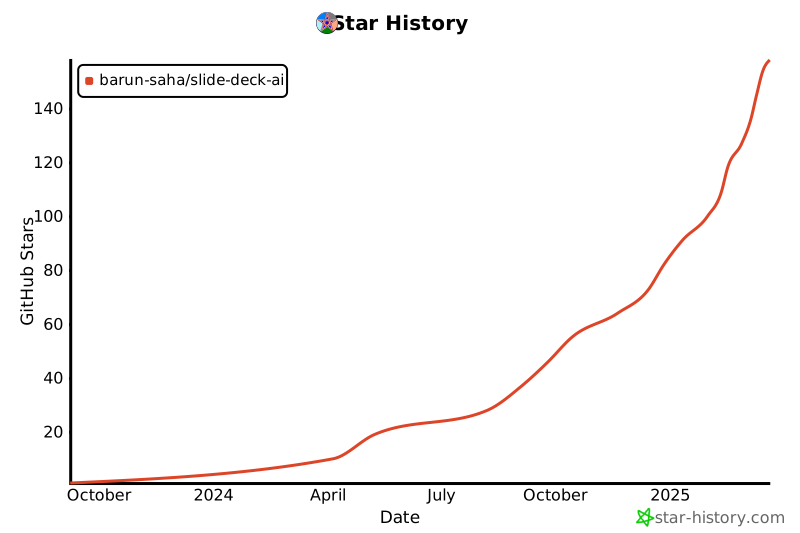
## Star History
[](https://star-history.com/#barun-saha/slide-deck-ai&Date)
## How It Works: The Automated Deck Generation Process
SlideDeck AI streamlines the creation process through the following steps:
1. **AI Content Generation:** Given a topic description, a Large Language Model (LLM) generates the *initial* slide content as structured JSON data based on a pre-defined schema.
2. **Visual Enhancement:** It uses keywords from the JSON output to search and download relevant images, which are added to the presentation with a certain probability.
3. **PPTX Assembly:** Subsequently, the powerful `python-pptx` library is used to generate the slides based on the structured JSON data. A user can choose from a set of pre-defined presentation templates.
4. **Refinement & Iteration:** At this stage onward, a user can provide additional instructions to *refine* the content (e.g., "add another slide," or "modify an existing slide"). A history of instructions is maintained for seamless iteration.
5. **Instant Download:** Every time SlideDeck AI generates a PowerPoint presentation, a download button is provided to instantly save the file.
In addition, SlideDeck AI can also create a presentation based on **PDF files**, transforming documents into decks!
## Python API Quickstart
<a target="_blank" href="https://colab.research.google.com/drive/1YA9EEmyiQFk03bOSc7lZnxK5l2hAL60l?usp=sharing">
<img src="https://colab.research.google.com/assets/colab-badge.svg" alt="Open In Colab"/>
</a>
```python
from slidedeckai.core import SlideDeckAI
slide_generator = SlideDeckAI(
model='[gg]gemini-2.5-flash-lite',
topic='Make a slide deck on AI',
api_key='your-google-api-key', # Or set via environment variable
)
pptx_path = slide_generator.generate()
print(f'🤖 Generated slide deck: {pptx_path}')
```
## CLI Usage
Generate a new slide deck:
```bash
slidedeckai generate --model '[gg]gemini-2.5-flash-lite' --topic 'Make a slide deck on AI' --api-key 'your-google-api-key'
```
Launch the Streamlit app:
```bash
slidedeckai launch
```
List supported models (these are the only models supported by SlideDeck AI):
```bash
slidedeckai --list-models
```
## Unmatched Flexibility: Choose Your AI Brain
SlideDeck AI stands out by supporting a wide array of LLMs from several online providers—Azure/ OpenAI, Google, SambaNova, Together AI, and OpenRouter. This gives you flexibility and control over your content generation style.
Most supported service providers also offer generous free usage tiers, meaning you can often start building without immediate billing concerns.
Model names in SlideDeck AI are specified in the `[code]model-name` format. It begins with a two-character prefix code in square brackets to indicate the provider, for example, `[oa]` for OpenAI, `[gg]` for Google Gemini, and so on. Following the code, the model name is specified, for example, `gemini-2.0-flash` or `gpt-4o`. So, to use Google Gemini 2.0 Flash Lite, the model name would be `[gg]gemini-2.0-flash-lite`.
Based on several experiments, SlideDeck AI generally recommends the use of Gemini Flash and GPT-4o to generate the best-quality slide decks.
The supported LLMs offer different styles of content generation. Use one of the following LLMs along with relevant API keys/access tokens, as appropriate, to create the content of the slide deck:
| LLM | Provider (code) | Requires API key | Characteristics |
|:------------------------------------|:-------------------------|:-------------------------------------------------------------------------------------------------------------------------|:-------------------------|
| Claude Haiku 4.5 | Anthropic (`an`) | Mandatory; [get here](https://platform.claude.com/settings/keys) | Faster, detailed |
| Gemini 2.0 Flash | Google Gemini API (`gg`) | Mandatory; [get here](https://aistudio.google.com/apikey) | Faster, longer content |
| Gemini 2.0 Flash Lite | Google Gemini API (`gg`) | Mandatory; [get here](https://aistudio.google.com/apikey) | Fastest, longer content |
| Gemini 2.5 Flash | Google Gemini API (`gg`) | Mandatory; [get here](https://aistudio.google.com/apikey) | Faster, longer content |
| Gemini 2.5 Flash Lite | Google Gemini API (`gg`) | Mandatory; [get here](https://aistudio.google.com/apikey) | Fastest, longer content |
| GPT-4.1-mini | OpenAI (`oa`) | Mandatory; [get here](https://platform.openai.com/settings/organization/api-keys) | Faster, medium content |
| GPT-4.1-nano | OpenAI (`oa`) | Mandatory; [get here](https://platform.openai.com/settings/organization/api-keys) | Faster, shorter content |
| GPT-5 | OpenAI (`oa`) | Mandatory; [get here](https://platform.openai.com/settings/organization/api-keys) | Slow, shorter content |
| GPT | Azure OpenAI (`az`) | Mandatory; [get here](https://ai.azure.com/resource/playground) NOTE: You need to have your subscription/billing set up | Faster, longer content |
| Command R+ | Cohere (`co`) | Mandatory; [get here](https://dashboard.cohere.com/api-keys) | Shorter, simpler content |
| Gemini-2.0-flash-001 | OpenRouter (`or`) | Mandatory; [get here](https://openrouter.ai/settings/keys) | Faster, longer content |
| GPT-3.5 Turbo | OpenRouter (`or`) | Mandatory; [get here](https://openrouter.ai/settings/keys) | Faster, longer content |
| DeepSeek-V3.1-Terminus | SambaNova (`sn`) | Mandatory; [get here](https://cloud.sambanova.ai/apis) | Fast, detailed content |
| Llama-3.3-Swallow-70B-Instruct-v0.4 | SambaNova (`sn`) | Mandatory; [get here](https://cloud.sambanova.ai/apis) | Fast, shorter |
| DeepSeek V3-0324 | Together AI (`to`) | Mandatory; [get here](https://api.together.ai/settings/api-keys) | Slower, medium-length |
| Llama 3.3 70B Instruct Turbo | Together AI (`to`) | Mandatory; [get here](https://api.together.ai/settings/api-keys) | Slower, detailed |
| Llama 3.1 8B Instruct Turbo 128K | Together AI (`to`) | Mandatory; [get here](https://api.together.ai/settings/api-keys) | Faster, shorter |
> **🔒 IMPORTANT: Your Privacy and Security are Paramount**
>
> SlideDeck AI does **NOT** store your API keys/tokens or transmit them elsewhere. Your key is _only_ used to invoke the relevant LLM for content generation—and that's it! As a fully **Open-Source** project, we encourage you to audit the code yourself for complete peace of mind.
In addition, offline LLMs provided by Ollama can be used. Read below to know more.
## Icons
SlideDeck AI uses a subset of icons from [bootstrap-icons-1.11.3](https://github.com/twbs/icons) (MIT license) in the slides. A few icons from [SVG Repo](https://www.svgrepo.com/)
(CC0, MIT, and Apache licenses) are also used.
## Local Development
SlideDeck AI uses LLMs via different providers. To run this project by yourself, you need to use an appropriate API key, for example, in a `.env` file.
Alternatively, you can provide the access token in the app's user interface itself (UI).
### Ultimate Privacy: Offline Generation with Ollama
SlideDeck AI allows the use of **offline LLMs** to generate the contents of the slide decks. This is typically suitable for individuals or organizations who would like to use self-hosted LLMs for privacy concerns, for example.
Offline LLMs are made available via Ollama. Therefore, a pre-requisite here is to have [Ollama installed](https://ollama.com/download) on the system and the desired [LLM](https://ollama.com/search) pulled locally. You should choose a model to use based on your hardware capacity. However, if you have no GPU, [gemma3:1b](https://ollama.com/library/gemma3:1b) can be a suitable model to run only on CPU.
In addition, the `RUN_IN_OFFLINE_MODE` environment variable needs to be set to `True` to enable the offline mode. This, for example, can be done using a `.env` file or from the terminal. The typical steps to use SlideDeck AI in offline mode (in a `bash` shell) are as follows:
```bash
# Environment initialization, especially on Debian
sudo apt update -y
sudo apt install python-is-python3 -y
sudo apt install git -y
# Change the package name based on the Python version installed: python -V
sudo apt install python3.11-venv -y
# Install Git Large File Storage (LFS)
sudo apt install git-lfs -y
git lfs install
ollama list # View locally available LLMs
export RUN_IN_OFFLINE_MODE=True # Enable the offline mode to use Ollama
git clone [https://github.com/barun-saha/slide-deck-ai.git](https://github.com/barun-saha/slide-deck-ai.git)
cd slide-deck-ai
git lfs pull # Pull the PPTX template files - ESSENTIAL STEP!
python -m venv venv # Create a virtual environment
source venv/bin/activate # On a Linux system
pip install -r requirements.txt
streamlit run ./app.py # Run the application
```
> 💡If you have cloned the repository locally but cannot open and view the PPTX templates, you may need to run `git lfs pull` to download the template files. Without this, although content generation will work, the slide deck cannot be created.
The `.env` file should be created inside the `slide-deck-ai` directory.
The UI is similar to the online mode. However, rather than selecting an LLM from a list, one has to write the name of the Ollama model to be used in a textbox. There is no API key asked here.
The online and offline modes are mutually exclusive. So, setting `RUN_IN_OFFLINE_MODE` to `False` will make SlideDeck AI use the online LLMs (i.e., the "original mode."). By default, `RUN_IN_OFFLINE_MODE` is set to `False`.
Finally, the focus is on using offline LLMs, not going completely offline. So, Internet connectivity would still be required to fetch the images from Pexels.
# Live Demo
Experience the power now!
- 🚀 Live App: [Try SlideDeck AI on Hugging Face Spaces](https://huggingface.co/spaces/barunsaha/slide-deck-ai)
- 🎥 Quick Demo: [Watch the core chat interface in action (YouTube)](https://youtu.be/QvAKzNKtk9k)
- 🤝 Enterprise Showcase: [See a demonstration using Azure OpenAI (YouTube)](https://youtu.be/oPbH-z3q0Mw)
# 🏆 Recognized Excellence
SlideDeck AI has won the 3rd Place in the [Llama 2 Hackathon with Clarifai](https://lablab.ai/event/llama-2-hackathon-with-clarifai) in 2023.
# Contributors
SlideDeck AI is glad to have the following community contributions:
- [Aditya](https://github.com/AdiBak): added support for page range selection for PDF files and new chat button.
- [Sagar Bharatbhai Bharadia](https://github.com/sagarbharadia17): added support for Gemini 2.5 Flash Lite and Gemini 2.5 Flash LLMs.
- [Sairam Pillai](https://github.com/sairampillai): unified the project's LLM access by migrating the API calls to **LiteLLM**.
- [Srinivasan Ragothaman](https://github.com/rsrini7): added OpenRouter support and API keys mapping from the `.env` file.
Thank you all for your contributions!
[](#contributors)
|